MHT-Specific Export Options
When exporting a document, you can define MHT-specific exporting options using the following dialog.
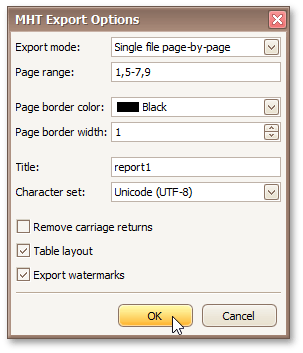
Export mode
Specifies how a document is exported to MHT. The following modes are available.
- The Single file mode allows export of a document to a single file, without dividing it into pages.
- The Single file page-by-page mode allows export of a document to a single file, divided into pages. In this mode, the Page range, Page border color and Page border width options are available.
- The Different files mode allows export of a document to multiple files, one for each document page. In this mode, the Page range, Page border color and Page border width options are available.
Page range
Specifies a range of pages which will be included in the resulting file. To separate page numbers, use commas. To set page ranges, use hyphens.
Page border color
Specifies the color of page borders from the available palettes.
Page border width
Specifies the width (in pixels) of page borders.
Title
Specifies the title of the created document.
Character set
Specifies the character set for the HTML document.
Remove carriage returns
Specifies whether to remove carriage returns.
Table layout
Specifies whether to use table or non-table layout in the resulting document.
Export watermarks
Specifies whether to export watermarks to HTML along with the rest of the document content.