Image-Specific Export Options
When exporting a document, you can define image-specific exporting options using the following dialog.
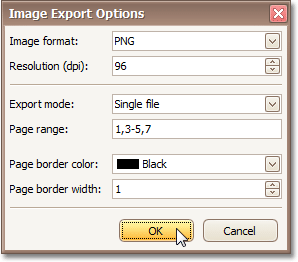
Image format
Specifies an image format to export a document. Available formats are BMP, GIF, JPEG, PNG, EMF, WMF and TIFF.
Resolution (dpi)
Specifies the required image resolution (in dpi).
Export mode
Specifies how a document is exported to an image. The following modes are available.
- The Single file mode allows export of a document to a single file, without dividing the output into pages.
- The Single file page-by-page mode allows export of a document to a single file, divided into pages. In this mode, the Page range, Page border color and Page border width options are available.
- The Different files mode allows export of a document to multiple files, one for each document page. In this mode, the Page range, Page border color and Page border width options are available.
Page range
Specifies a range of pages which will be included in the resulting file. To separate page numbers, use commas. To set page ranges, use hyphens.
Page border color
Specifies the color of page borders.
Page border width
Specifies the width (in pixels) of page borders.